
A friend of mine had an app request for daily commuting to/from work. The use case is simple, you’re getting ready to leave for work/home and want to know when the next train/bus leaves and if you should hurry or not. I implemented this today in a few hours with Cursor and thought I’d write about it.
App specification
- A simple iOS app where you can see when the next train/bus for your saved routes, simple view with “In X minutes”.
- Search for a route and save it, incuding choosing different travel options if available.
- Swipe/click on a route and see the next-next departure.
- Click on the route to get more information, such as arrival time and details if the route has several steps.
- The app uses your current location to figure out in which way you’re travelling, so it shows the right direction of the route.
- Using SL:s open API available here
I quickly added some feature requests of my own:
- The ability to add how many minutes it takes to walk to the correct station. I have 10 min walk to the station, I don’t want to see a train that leaves in 5 minutes.
- Color code the route after how much I need to hurry: green, orange, red.
- Show deviations/disturbances on the relevant route.
- Filter out unnecessary deviations (I’m only interested in cancelled/delayed trains, not notices about broken elevators or renovations at entrances)
- An option to always show elevators, but not other minor deviations - for friends who are travelling with a stroller or wheelchair.
- Fallback for Location services, the ability to set up when you travel which way, so the app knows which one to use if location is not available.
Getting started
Building the app First ugly draft (I removed the pills at the top later)
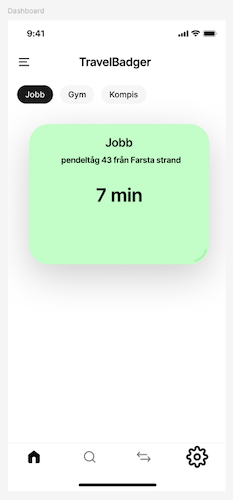
I wrote an app description md-file with what I wanted. Target: iOS 26, using native Swift and the features described above. I asked Cursor (in Plan mode) to go through it and we identified a bunch of outstanding questions. I then asked Cursor (once again in Plan mode) to create an implementation plan in several phases, so we could iterate and test after each phase. This is what Cursor created and we iterated on:
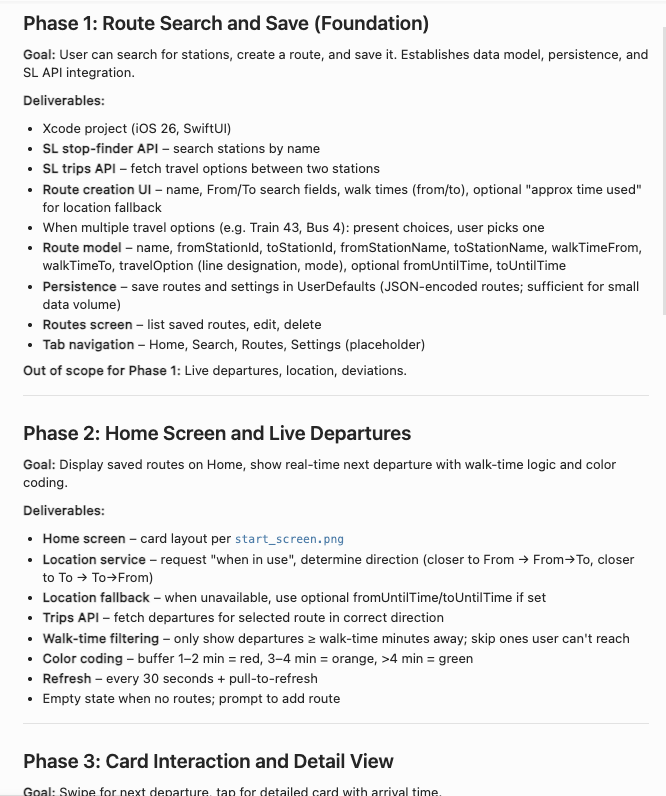
In just a few minutes, we had the XCode-project up and running. I remembered to ask Cursor to add the LaunchScreen (I’ve learned now that this is necessary to get the app in Fullscreen) and soon we had a first version, where I could search for a route and save it. Then we just continued, one phase at a time (with just some challenges described further down). In a few hours we had a working app.
The “finished” app
Home screen with saved routes, color coded after how much I need to hurry: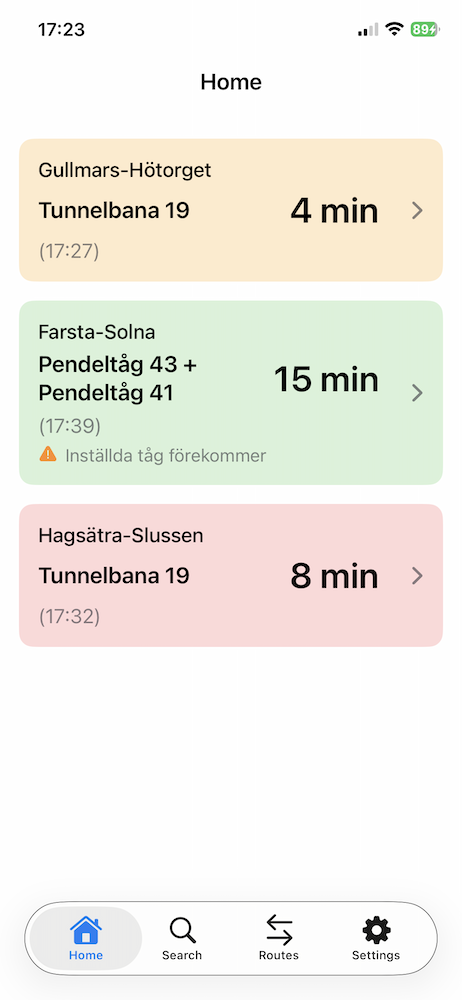
An expanded route with more information and several steps. Some deviations.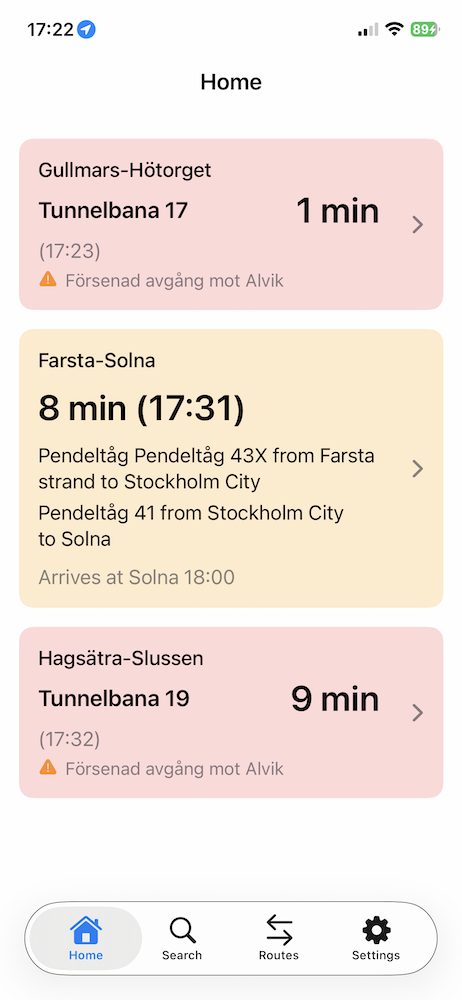
Adding/editing a route, entering time to walk to station and choosing travel options: Settings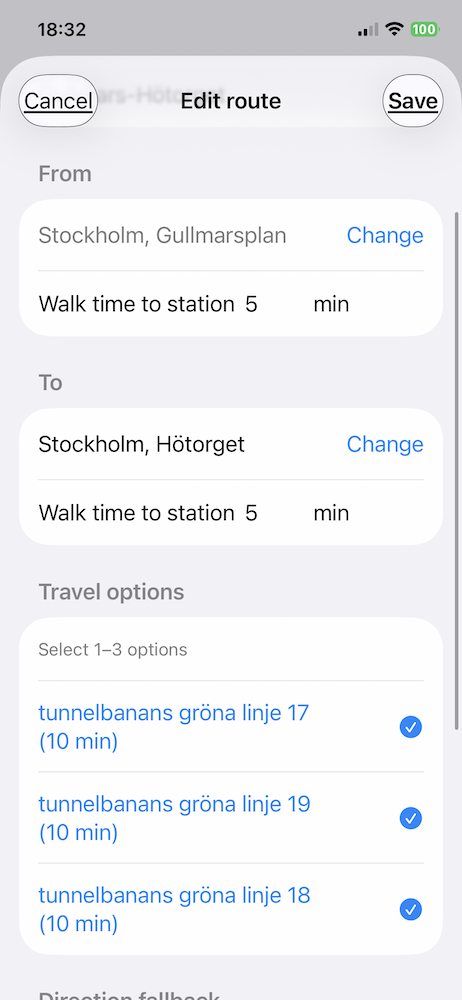
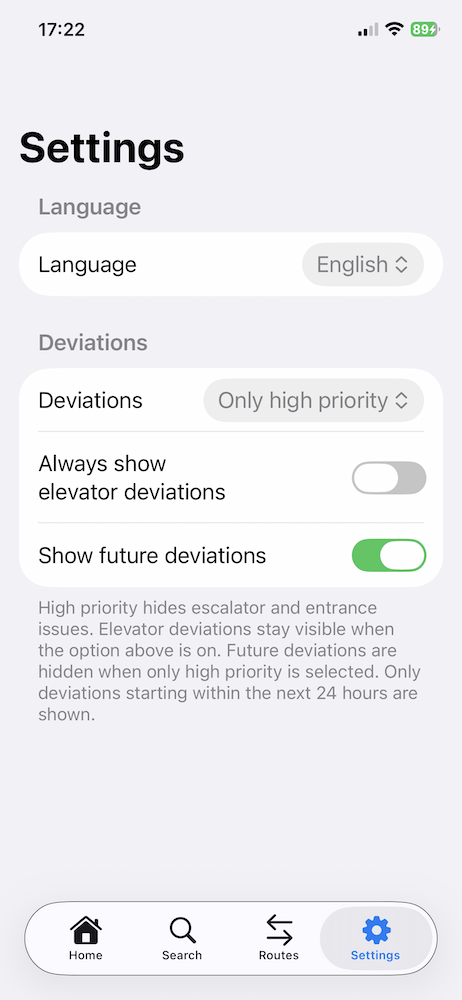
Why this app?
What is the main difference from the SL app, you might wonder? In the SL app I need to search for my trip to see the next departures. This app presents it at a glance. This app knows where you are going (you saved your route and it knows from your location which direction you’re going). It also only shows the deviations relevant to you, you don’t need to scroll through escalator/entrance deviations you don’t care about. And mainly, it was a fun thing to build for myself and my friend.
Challenges
The main challenge was the API provided by SL. There is a limit, so you can only get 3 journeys per call. In some cases this meant that the app didn’t get relevant departures, even though they existed in a few minutes.
Edge case 1: I need 10 minutes to walk to the station, so I only want departures 10 minutes from now. There are three departures before that time. The app will filter the ones that are not relevant and show “No departures”. If you search for a journey on SL, even if you send Departure time 15:20, it will still show departures at 15:15 as it’s a real time optimist - and therefore you can go beyond the three next departure limit I just described.
Edge case 2: I only want to travel between the two stations through a specific route, for example only with subway line 18. The upcoming three departures that could take me to my end station use another subway line or a mix with buses. Once again “No departures”. (This can probably be saved with sending in travel limits such as “only trains, no buses”, but I haven’t tried that yet.)
I tried several different approaches here, but it’s not perfect yet. I also added retries, so if a route is showing “No departures” it will search again with current time + walk-time + 10 minutes, to try to get a new result. It works quite well now, but there might be corner cases where this doesn’t work.

Cursor trying to understand SL:s API (generated by ChatGTP)
Time spent
I spent maybe 20 minutes in Figma this morning to create some wireframes. Then maybe 30 minutes to write the specification and iterate on the plan with Cursor.
According to my git history the first commit was at 11:38 today and last commit 18:17. I’ve had some breaks for lunch and other stuff in between, so I would guess I’ve spent around 5 hours vibe coding this app. So total around 6 hours. First two phases were finished in an hour. Most of the time was spent struggling with the edge case challenges described above and filtering out deviations correctly.
What was needed
- Cursor Pro license. I pay 20$ (~182 SEK) a month for my personal license (almost out of tokens again so will probably upgrade soon).
- Apple Developer account. 99$ (~904 SEK) a year for an individual license.
- Xcode for building for iOS (free)
- Figma free limited account (could have used other free options)
- SL:s free API (thank you Trafiklab and SL!)
Tips and tricks
One thing I’ve started doing more lately is to switch between Agent and Plan-mode a lot more. I find that this stops Cursor from digging holes. I describe what the problem is and what we’ve already tried and Cursor thinks it through and gives suggestions. We can then iterate on the plan before building. Much better than just just running ahead and trying the same thing over and over.
As always – it’s often easier to read through the API and figure things out yourself. I don’t know how many times Cursor tried to increase the journey above the 3 journey limit which only resulted in errors and reverts.
I used ChatGPT to create an AppIcon with the prompt: “Can you create an App Icon for an iOS app with a travelling badger on a subway.”

Travel Badger App Icon
Next steps
I will upload the app to Testflight and let my friend start using it. It’s working and quite complete already. I’ve already learned a lot about Testflight and inviting friends to try my apps because of my main app I’m building (blog post upcoming).
Idéas I have for the next version are:
- Notifications. I would like to get notifications around the time I usually leave if there are deviances/disturbances on my route, so I know if I need to leave earlier.
- An iOS-widget would be great.
- An Apple watch app would be useful.
There are other APIs that can be used, ResRobot and Trafiklab, I haven’t investigated them yet, since they are for other cities as well and I was only interested i SL data.
March 20th, edit: The app now has Live Activity and a widget as well! I will write more about this in a second blog post soon.
As always this blog post is manually written by me, without AI, so any grammatical or spelling errors are my own.